

Perhaps you notice that your CRM is not delivering the results you expected. Or you may not even have one, because you are not quite sure where to start in order to really get value from it. So today, we are going to tell you how to get the most out of a CRM for sales, what the most common mistakes are, and what you need to take into account in order to see real results.
What is a CRM used for in sales
Mainly, with a CRM we organize and control the entire sales process of a business through very common channels such as phone calls. Although it may seem basic, in practice the full potential of a CRM is sometimes not fully used.
Its real value lies in the fact that it allows us to see at what stage each customer is at all times, what interactions have been made, and what the next step is to take, avoiding many conversations being left hanging due to lack of follow-up. It helps us be clear about who to call, when, and why, without needing to remember everything because we will have access to tasks, reminders, and each customer’s history.
In summary, the CRM helps us have control over customer service, work in a more organized way, and not miss sales opportunities.
How to automate tasks without losing control
Sometimes it happens that a poorly planned automation ends up generating the opposite effect to what we want: loss of context, incomplete communications or even missed opportunities, and in the end, we end up putting the CRM aside because it is not giving us results. But what we really need to achieve is a balance between eliminating repetitive tasks (automating) without losing visibility or control over the entire sales process.
It is important to know which tasks it is advisable to automate so that it does not become a mess. In this sense, we find it appropriate to automate tasks such as:
- Follow-up reminders (tasks such as calls, emails or a meeting).
- Automatic creation of leads from calls.
- Updating customer statuses.
- Automatic logging of calls and customer interactions.
- Lead assignment to the team.
The simpler and clearer it is, the easier it will be for the team to adopt it and use it correctly in their day-to-day work. On the other hand, a good practice is to start with CRMs that are easy to use but complete in terms of functionality, find a provider that allows you to use a CRM for free, and there are some, and thus check whether it really adapts to the needs of the business.
Common mistakes when using a CRM for sales
If in practice you are not seeing the expected value in a CRM, it is because perhaps you are not treating the tool as it should be used in day-to-day work; that is, using it only to store contacts is a mistake. Although this is part of its function, staying there means wasting all its potential. Some of the mistakes we can notice when using a CRM are:
Not having clear objectives from the beginning
Perhaps one of the most common mistakes is starting to use a CRM without first defining what you want to achieve with it. Are we looking to improve customer follow-up? Increase conversion?
When the objectives are not completely clear, we turn the CRM into a system where only information is accumulated, but it provides no direction. Instead, when we have a defined purpose, it is much easier to configure the system, measure results, and make decisions.
Not updating CRM information
A CRM is useful when it truly reflects the reality of the business. If the data is not updated, we will not see the real results we are looking for. In day-to-day work, this can be seen in potential opportunities whose real status is not reflected, follow-ups that are not carried out on time, and even teams stopping using the CRM because they perceive that the information is not fully reliable or is incomplete.
That is why we consider one of the most important aspects to be updating within the workflow, as well as configuring the CRM in a way that facilitates this update. For example, we can activate automatic call logging, create tasks after each conversation, and thus increase the likelihood that the team does it consistently.
Not using the CRM for sales follow-up
It can also be common to use the CRM only as a place to store information, but without taking advantage of it as a follow-up tool. That is, calls, emails, or contacts are recorded, but this information is not used to move opportunities forward.
As a result, we lose one of the greatest benefits of a CRM for sales. When used correctly, we can be clear about what actions need to be taken at each moment, for example during a call with a client, since we can access the customer’s history and check notes and previous calls, and see which customers need more attention.
That is why we consider it key to use all the functionalities that a CRM provides, such as task creation, follow-up reminders, activity views, for example “leads not contacted in X days”. This way we keep an active history and avoid our leads going cold. In addition, if the CRM is connected to a virtual switchboard, we can multiply these advantages; all calls will be recorded on the platform where we can see analysis of each conversation or its follow-up.
Not having an experienced provider
Finally, one aspect that we sometimes overlook is the importance of having a provider that truly understands the commercial context. An experienced provider that offers a clear, intuitive, and easy-to-use platform, since this directly influences the learning curve for agents. At the same time, it must be complete enough to cover the real needs of a sales process without falling short as the business grows.
Another point to consider is support. Having a provider that offers 24/7 support to solve doubts or incidents so that work can continue normally.
All of this may seem a bit difficult to find in a single provider, but it is not at all, and we can find solutions that provide all of this and more.
Configure your CRM for sales based on your objective
To get the most out of a CRM we must understand that the configuration has to respond to specific objectives. From experience in commercial environments, what really works is configuring a CRM as a tool to achieve certain goals, for example:
- Increase the lead conversion rate.
- Reduce customer response time.
- Improve sales follow-up.
A good example of this can be seen in a simple configuration within the Megacall CRM with a specific objective: prioritizing potential customers.
The context is when a company receives many leads in a week and the sales team is unable to identify those that are truly promising from those that are not fully interested. Here, we lose time by not prioritizing customers.
What we can do to solve this is have the team score each potential customer according to some rules considered important for scoring. These scores trigger certain sales actions dedicated exclusively to them. From the Megacall CRM we can set tasks and reminders that ensure that actions are prioritized for that customer and are carried out on time.
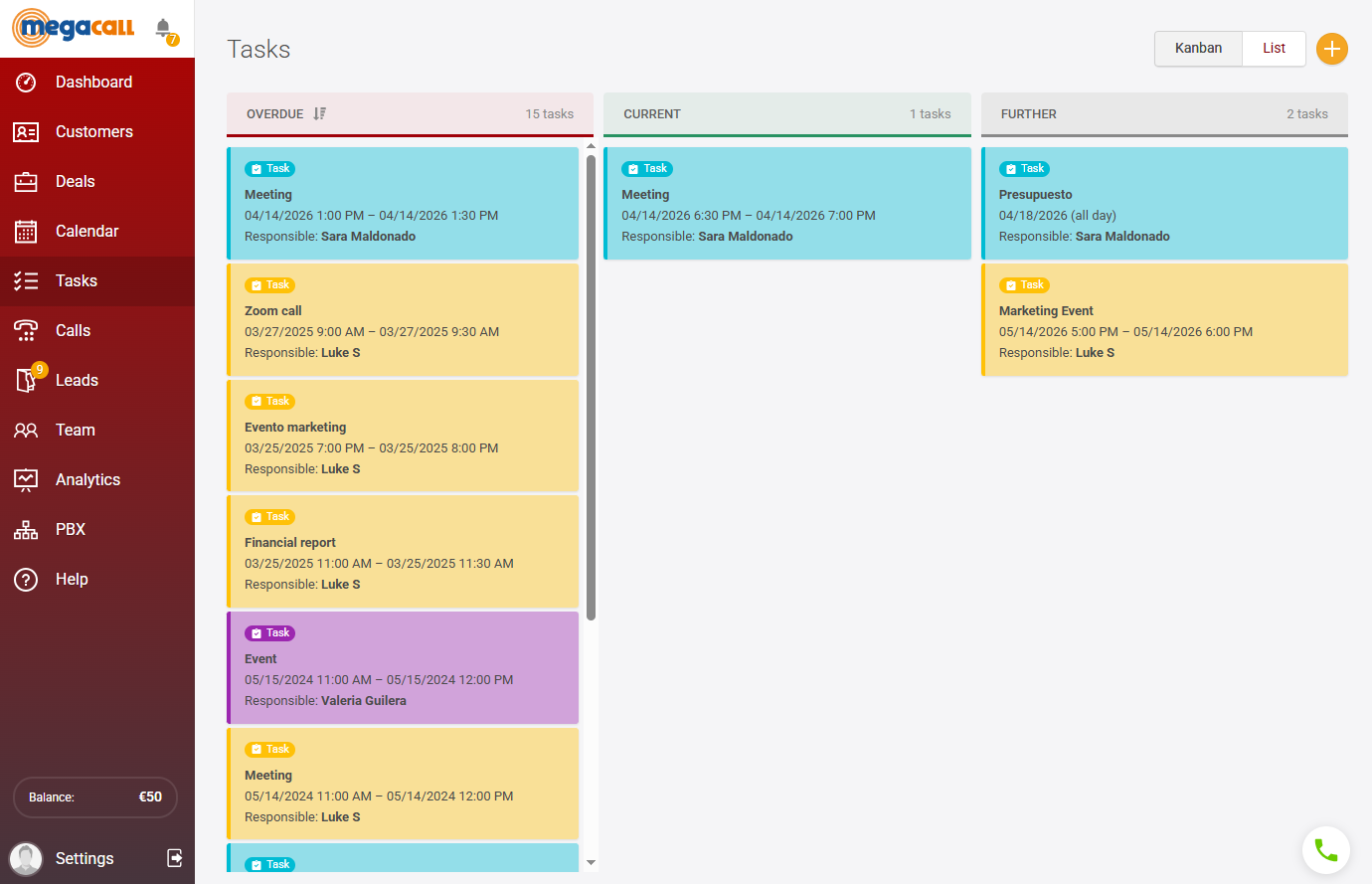
In addition, it is worth mentioning that each call is automatically recorded in Megacall CRM, which gives us more access to information about the customer’s interest: how many times they have called, whether they have responded, whether there has been a conversation or not.
All of this helps the agent to be clear about who to contact first and they can even call directly from the CRM and have the entire history on the same screen to speed up work and avoid switching between tools.
In the end, what we achieve with this type of configuration is something very simple but important: that the team dedicates its time to customers with a real chance of becoming a sale.
Why should I have a CRM for sales in my business?
If there are two very important things to keep in mind for customer service and sales to work well in a business, they are: telephony and the CRM. In the end, both go hand in hand, because to use a CRM it generally has to be connected to telephony in order to record interactions and manage contacts. In addition, if this is completed with a PBX, we will achieve a very complete and organized management of phone calls.
But focusing on the CRM, it is important that a business has this tool because:
- From experience, without a system that centralizes information and structures the process, it is very difficult to scale sales in a controlled way.
- A CRM for sales allows you to have all relevant customer information in one place: calls, emails, contact history, opportunities… This makes daily work easier and avoids situations such as not knowing at what stage a customer is.
- We can do follow-up without having to remember who needed to be called. Everything is visible to the agent.
- Related to the previous point, from the CRM we can see what the sales landscape looks like, which customers are moving forward and which ones are stuck. We can detect problems before they affect results.
- Team organization is also improved. Tasks can be assigned to agents and each one knows what they have to do, and the manager can have an overall view.
- Finally, having a CRM for sales is not only about organization, it is also about growth, since we can identify what is working and what is not, and that in sales is essential.
How do I start using a CRM for sales
If we want to have a record of all phone calls and then follow up on them, the main thing in order to use the CRM is to connect it with telephony. Therefore, the first step is to have a VoIP telephony provider that allows calls to be integrated within the CRM.
Ideally, this provider should meet what is needed for day-to-day work: automatic call logging, easy integration, good call quality, and a simple setup. In this sense, Megacall allows you to work with virtual numbers from the start, paying only for the number -from €2 per month with annual billing and top-up balance-, and in case you already have a number, you can port the one you are already using, so it is a good alternative to avoid losing contacts.
We can also connect both the PBX and the CRM for free. In addition, it includes setup instructions to help especially at the beginning and for those who still do not have much experience with these services.
Once you have your virtual number, there are two ways to activate Megacall CRM:
- During the initial setup of the virtual PBX with the help of the setup wizard.
- If you already have the PBX activated and configured, you can add the CRM from the Settings - Integrations and APIsection.
From here you can already configure your CRM, define a sales process, and adapt it to the team.
You may also like…


The 400 prefix and the new regulation for commercial calls
September 28, 2026

Call whispering: the discreet support that improves calls
September 14, 2026